
What and how it can be used:
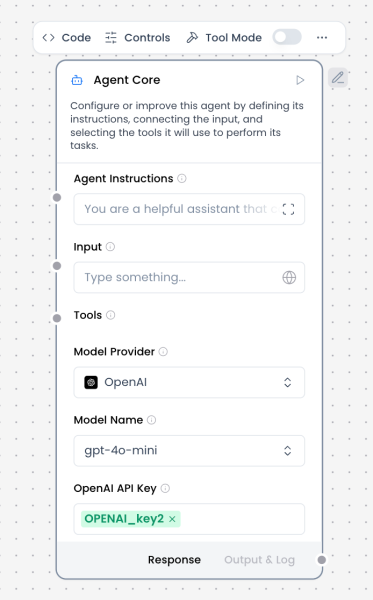
The Agent Core component is the central orchestration unit of an AI agent. It coordinates reasoning, decision-making, and execution by combining user input, system instructions, tools, memory, and language models into a single autonomous workflow.
Unlike a standalone Language Model component, the Agent Core can plan multi-step actions, decide when to call tools, integrate retrieved knowledge, and maintain conversational context. It acts as the “brain” of the agent, determining what to do next rather than simply generating a single response.
The Agent Core receives structured or conversational input, applies the configured agent instructions, selects and invokes tools when necessary, and produces a final response or intermediate outputs that can be routed to other components.
When/how the component should be used:
- Use when building autonomous or semi-autonomous solutions that require reasoning and decision-making
- Use when the agent must select between multiple tools or data sources
- Use when conversation memory, context, or state is required
- Use for multi-step workflows (e.g., search → retrieve → analyze → respond)
- Use instead of a plain Language Model when tool usage, planning, or orchestration is needed
- Ideal for assistants that interact with APIs, databases, knowledge bases, or external systems
Connections with other components:
Inputs / Context Providers
- Chat Input
- Text Input
- Prompt Template
- Message History
- Knowledge Base – Files
- Structured Output
- Parser
Tools (Tool Mode)
- Web Search
- News Search
- RSS Reader
- SQL Database
- API Request
- Python Interpreter
- Calculator
- Directory
- URL
- Current Date
- Mock Data Generator
Outputs
- Chat Output
- Text Output
- Structured Output
- Save File
- Notify
Routing / Control
- Smart Router
- If-Else
- Guardrail
- Human-in-the-loop
Configurable settings:
- Agent Instruction
System-level instructions that define the agent’s role, behavior, constraints, and goals. This is the primary prompt governing agent reasoning. - Input
Incoming message or data from Chat Input, Text Input, or other components. - Model Provider
Selects the LLM provider used by the agent (e.g., OpenAI, Anthropic, Google). - Model Name
Specifies the exact model used for reasoning and generation. - API Key
Authentication key for the selected model provider. - Tools
Connected tool components that the agent may invoke dynamically during execution. - Memory / Message History
Optional integration for retaining conversation context across turns. - Streaming
Enables partial or real-time output streaming. - Temperature / Model Parameters
Controls creativity and response variability.
Control Section:
- Agent Instruction
- Input
- Model Provider
- Model Name
- API Key
- Tools
- Stream
- Temperature
Default values:
- Model Provider = OpenAI
- Model Name = gpt-4o-mini (or platform default)
- Temperature = 0.1
- Stream = on
- Tools = none connected by default
- Memory = disabled unless explicitly connected
Expected default behavior:
- Processes one user request at a time
- Applies Agent Instructions consistently
- Does not call tools unless required by the task
- Produces a single coherent response per turn
- Preserves message roles and conversation structure when connected to Chat Input / Output
- Fails clearly when tools or inputs are misconfigured
Customization and controls:
- Adjust agent behavior through Agent Instruction rather than prompt templates
- Add or remove tools to constrain or expand agent capabilities
- Control determinism and creativity via temperature
- Combine with Guardrails for safety or compliance
- Use Smart Router or If-Else for multi-agent or conditional flows
- Enable Human-in-the-loop for approval-based execution