
What and how it can be used:
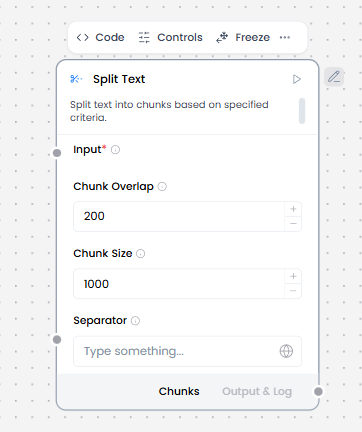
The Split Text component divides large text content into smaller chunks or segments based on specified criteria (separator). This is essential for processing long documents that exceed model token limits or for organizing content into manageable pieces for indexing and retrieval.
When/how the component should be used:
- Use for preparing text for embeddings
- Use for LLM context management
- Use for knowledge base ingestion
- Ideal for preparing documents for indexing in Knowledge Base – Files
- When you need to analyze or process text in smaller, logical units
- Input long text (documents, notes, transcripts).
- Configure chunk size and overlap.
- Output chunks to Embedding Model or Language Model.
- Often placed between Knowledge Base / URL / Directory and Embedding Model.
Connections with other components:
- Chat Output
- Batch Run
- DataFrame Operations
- Parser
- Save File
- Type Convert
- Loop
- Notify
- ChromaDB
Configurable settings:
- Input
- Chunk Overlap
- Chunk Size
- Separator
Default settings:
- Input
- Chunk Overlap
- Chunk Size
- Separator
Control Section:
- Input
- Chunk Overlap
- Chunk Size
- Separator
- Text key
- Keep Separator
Default values:
- Chunk Overlap = 200
- Chunk Size = 1000
- Separator = on
- Text key = text
- Keep Separator = False
Desired Behaviour:
- Stable chunk boundaries