
What and how it can be used:
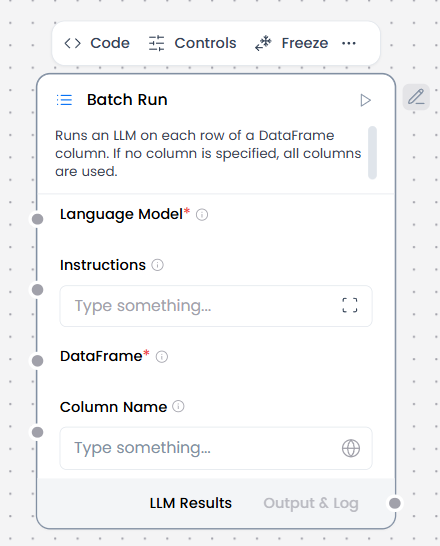
The Batch Run component processes multiple inputs or tasks sequentially or in parallel, allowing the agent to handle bulk operations efficiently. It takes a list of items (texts, queries, files, etc.) and executes the same workflow or operation on each item, collecting all results for consolidated output.
When/how the component should be used:
- When you need to process multiple text entries from a DataFrame (like CSV files)
- For bulk/batch processing where you want to apply the same LLM operation to many inputs
- When processing tabular data where each row needs an LLM response
- For offline processing tasks where you’re working with structured data files
- Connect Language model component to a Batch Run component’s Language model port.
- Connect DataFrame output from another component to the Batch Run component’s DataFrame input. For example, you could connect a Read File component with a CSV file.
- In the Batch Run component’s Column Name field, enter the name of the column in the incoming DataFrame that contains the text to process. For example, if you want to extract text from a name column in a CSV file, enter name in the Column Name field.
- Connect the Batch Run component’s Batch Results output to a Parser component’s DataFrame input.
- Optional: In the Batch Run component’s header menu, click Controls, enable the System Message parameter, click Close, and then enter an instruction for how you want the LLM to process each cell extracted from the file. For example, Create a business card for each doctor.
- In the Parser component’s Template field, enter a template for processing the Batch Run component’s new DataFrame columns (text_input, model_response, and batch_index) e.g. record_number: {batch_index}, name: {text_input}, summary: {model_response}
- Connect Chat Input to the Language Model and Chat Output to the Parser so as to use the chat UI.
Connections with other components:
- ChatOutput
- DataFrame Operations
- Chat Output
- Parser
- Save File
- Type Convert
- Loop
- Notify
- ChromaDB
Configurable settings:
- Column Name (write the columns from csv)
- Instructions ( write instructions)
Default settings:
- Column Name (write the columns from csv/xls)
- Instructions ( write instructions)
Control Section:
- Language Model
- Instructions
- Dataframe
- Column Name
- Output Column Name
- Enable Metadata
Default values:
- Output Column Name = model_response
Desired Behaviour:
- Independent execution per item
- Partial failures surfaced