
What and how it can be used:
The Smart Router component intelligently directs user requests to the most appropriate agent, workflow, or processing path based on the content, intent, or context of the input. It analyzes incoming messages and automatically routes them to specialized agents or sub-workflows, enabling efficient handling of diverse queries within a single system.
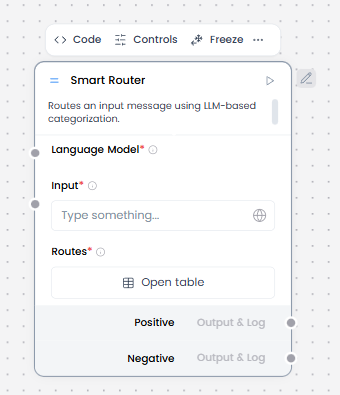
When/how the component should be used:
- When you need LLM-based routing.
- When you have multiple flow paths.
- Input data (from Chat Input or Parser).
- Connect the Language Model component to the Smart Router component.
- Define routing rules based on fields, values, or ranges.
- Connect each route to a dedicated downstream path.
- Always include a default or fallback route.
Connections with other components:
- Chat Output
- Text Input
- Text Output
- Agent Core
- API Request
- Directory
- News Search
- RSS Reader
- SQL Database
- Web Search
- Language Model
- Batch Run
- LLM Router
- Parser
- Python Interpreter
- Save File
- Smart Function
- Split Text
- Structured Output
- Type Convert
- Listen
- Notify
- Calculator
- Anonymization
- Guardrail
- Human-in-the-loop
- Bing Search API
- Google Search API
- ChromaDB
- If-Else
Configurable settings:
- Language Model ( From language model component)
- Input ( write input or get value from another component)
- Routes
Default settings:
- Language Model ( From language model component)
- Input ( write input or get value from another component)
- Routes
Control Section:
- Language Model
- Input
- Routes
- Override Output
- Include Else Output
- Additional Instructions
Desired Behaviour:
- Deterministic routing
- No hidden learning