
What and how it can be used:
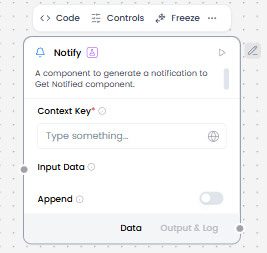
The Notify component sends notifications or messages to other parts of the workflow, enabling asynchronous communication and event-driven architectures. It works specifically with the Listen component to trigger downstream processes. When Notify sends a notification to a specific channel or topic, any Listen components subscribed to that channel receive the notification and can execute their workflows accordingly.
When/how the component should be used:
- Perfect for broadcasting events to multiple listeners simultaneously.
- Ideal for implementing event-driven patterns where one process notifies others.
- The resulting notification is sent to the Listen component. • The notification data can then be passed to other components in the flow, such as the If-Else component.
- The Notify and Listen components are used together.
Connections with other components:
- Chat Output
- Data Operations
- Parser
- Save File
- Smart Function
- Split Text
- Type Convert
- ChromaDB
Configurable settings:
- Context key ( From another component or Write something)
- Input Data ( From another component)
- Append ( choose on or off )
Default settings:
- Context key ( From another component or Write something)
- Input Data ( From another component)
- Append ( choose on or off )
Control Section:
- Context key
- Input Data
- Append
Desired Behaviour:
- Send notifications or events outward.