
What and how it can be used:
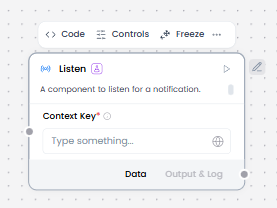
The Listen component waits for and receives notifications from other parts of the workflow. It works specifically with the Notify component to enable asynchronous communication between different workflow segments or processes. When a Notify component sends a notification, the Listen component captures it and triggers the next steps in the workflow, enabling event-driven architectures and decoupled workflow execution.
When/how the component should be used:
- Use when you need to wait for an event or notification from another workflow component.
- The Listen component is used when you need to receive notifications from a Notify component.
- When building flows that require state-based triggering between different parts of the flow.
- The Notify and Listen components must be used together as a pair.
- The Notify component sends notification data.
- The Listen component receives that notification data.
- The received data can then be passed to other components like If-Else.
Connections with other components:
- Chat Output
- Data Operations
- Parser
- Save File
- Smart Function
- Split Text
- Type Converter
- Notify
- ChromaDB
Configurable settings:
- Context key (From another component or Write something)
Default settings:
- Context key (From another component or Write something)
Control Section:
- Context key
Desired Behaviour:
- Receive notifications and events.