
What and how it can be used:
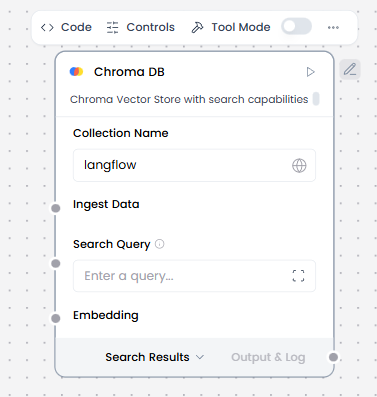
Chroma DB is an open-source vector database component designed specifically for AI applications. It stores document embeddings (vector representations) and enables fast semantic search and retrieval. Chroma DB powers Retrieval-Augmented Generation (RAG) by finding relevant documents based on meaning rather than exact keyword matches, allowing AI agents to access and reference specific knowledge.
When/how the component should be used:
- Use for semantic search, RAG, or clustering over embeddings.
- Ideal for building RAG (Retrieval-Augmented Generation) applications.
- Perfect for question-answering systems that reference specific knowledge sources.
- Add the following components to the flow: ChromaDB, Knowledge Base – Files, Split Text, Embedding Model, Chat Input, Chat Output, Agent Core.
- Connect Knowledge-Base Files output to Split Text’s input.
- In the Split Text component, configure chunk size and overlap.
- Connect Split Text’s output to ChromaDB’s Ingest Data input.
- In the Embedding Model component, enter your OpenAI API key or configure the Agent component to use a different LLM.
- Connect Embedding Model’s output to ChromaDB’s Embedding Model input.
- In the ChromaDB component’s header menu, enable Tool Mode.
- In the Actions list, configure the ChromaDB actions that you want to provide to the agent. You can select the actions you want to allow, and you can edit each action’s slug (agentic label) and description, which help the agent decide which tools to use.
- Connect the Google Sheets component’s Toolset output to the Agent Core component’s Tools input.
- In the Agent Core component, enter your OpenAI API key or configure the Agent component to use a different LLM.
- Connect the Chat Input component to the Agent Core component’s Input port.
- Connect the Agent Core component’s Output port to the Chat Output component, which returns the final response to the user or application.
- This flow is a healthy RAG + agent pipeline using ChromaDB as the vector store. It can be used as a Clinical knowledge assistant (guideline QA).
Connections with other components:
- Chat Output
- Batch Run
- Data Operations
- DataFrame Operations
- Parser
- Save File
- Smart Function
- Split Text
- Type Convert
- Loop
- Notify
In tool mode:
- Agent Core
- Human-in-the-loop
Configurable settings:
- Collection Name ( Write the name of collection)
- Ingest Data (From Split Text component)
- Embedding (from Embedding Model component)
- Actions from Tool Mode
- Number of Results ( Write the number)
Default settings:
- Collection Name ( Write the name of collection)
- Ingest Data (From Split Text component)
- Embedding (from Embedding Model component)
- Actions from Tool Mode
- Number of Results ( Write the number)
Control Section:
- Collection Name
- Persist Directory
- Ingest Data
- Search Query
- Cache Vector Store
- Embedding
- Server CORS Allow Origins
- Server Host
- Server HTTP Port
- Server gRPC Port
- Server SSL Enabled
- Allow Diplicates
- Search Type
- Number of Results
- Limit
Default values:
- Mode = Human in the Loop for Messages
- Timeout (seconds) = 60
Desired Behaviour:
- Clear prompt to user
- Deterministic flow resumption
- Input validated if possible