
Data operations = default
What and how it can be used:
The Data Operations component performs various operations on a Data object. It manipulates, transforms, and processes data objects through different operations such as filtering, sorting, extracting fields, merging, grouping, and other data manipulations.
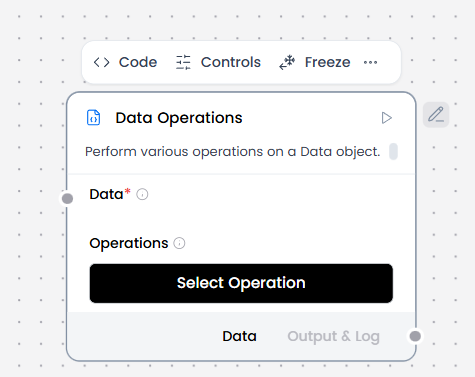
When/how the component should be used:
- Use when you need to perform operations on a data object.
- Ideal for transforming, filtering, or restructuring data
- Essential for preparing data for further processing.
- This example shows how to use Data Operations component in a flow using data from a webhook payload.
- Create a flow with a Webhook component and a Data Operations component, and then connect the Webhook component’s output to the Data Operations component’s Data input.
- In the Operations field, select the operation you want to perform on the incoming Data. For this example, select the Select Keys operation.
- Connect the Data Operations component’s output to a Chat Output component.
Connections with other components:
- ChatOutput
- Parser
- Save File
- Smart Function
- Split Text
- Type Convert
- Notify
- ChromaDB
Configurable settings:
- Data ( From another components )
- Operations ( Select operations )
Default settings:
- Data ( From another components )
- Operations ( Select operations )
Control Section:
- Data
- Operations
Desired Behaviour:
- Perform operations consistently.
Data operations = Select Keys
What and how it can be used:
The Select Keys operation extracts selected keys from a Data object. It allows you to pick specific properties or fields from an object or array of objects, returning only the specified keys and their values while discarding the rest.
When/how the component should be used:
- Use when you need to extract specific fields from a data object
- Use to keep only required fields.
- Use to reduce payload size and complexity.
Connections with other components:
- ChatOutput
- Parser
- Save File
- Smart Function
- Split Text
- Type Convert
- Notify
- ChromaDB
Configurable settings:
- Data ( From another components )
- Operations ( Select operations )
- Select keys
Default settings:
- Data ( From another components )
- Operations ( Select operations )
- Select keys
Control Section:
- Data
- Operations
- Select keys
Default values:
- Operations = Select keys
Desired Behaviour:
- Drop unspecified fields.
- Keep only the selected field values.
Data operations = Literal Eval
What and how it can be used:
The Literal Eval operation evaluates string values as Python literals. It safely converts string representations of Python data structures (lists, numbers, booleans, None) into their actual Python object equivalents.
When/how the component should be used:
- Use when you need to convert string representations to actual data structures
- Use when structured data is encoded as text and must be converted into native types.
- Ideal for parsing configuration strings or user input that contains data structures
- Essential for processing serialized data in string format
Connections with other components:
- ChatOutput
- Parser
- Save File
- Smart Function
- Split Text
- Type Convert
- Notify
- ChromaDB
Configurable settings:
- Data ( From another components )
- Operations ( Select operations )
Default settings:
- Data ( From another components )
- Operations ( Select operations )
Control Section:
- Data
- Operations
Default values:
- Operations = Literal Eval
Desired Behaviour:
- Convert string values into structured data safely
Data operations = Combine
What and how it can be used:
The Combine operation combines multiple data objects into one. It merges, concatenates, or joins multiple data sources (objects, arrays, values) into a single unified data structure. This component enables aggregation of data from different sources into one cohesive output.
When/how the component should be used:
- Use when you need to merge multiple data objects or arrays
- Used to merge multiple inputs into a single data structure.
- Use when downstream processing requires unified context.
- Ideal for combining results from different sources or operations
- Best for aggregating data from parallel workflow branches
Connections with other components:
- ChatOutput
- Parser
- Save File
- Smart Function
- Split Text
- Type Convert
- Notify
- ChromaDB
Configurable settings:
- Data ( From another components )
- Operations ( Select operations )
Default settings:
- Data ( From another components )
- Operations ( Select operations )
Control Section:
- Data
- Operations
Default values:
- Operations = Combine
Desired Behaviour:
- Preserve original items
- Maintain input order where possible
Data operations = Filter Values
What and how it can be used:
The Filter Values operation filters data based on key-value pair. It selects items from a data collection (array of objects) where a specific key matches a specified value, returning only the items that meet the filter criteria.
When/how the component should be used:
- Use when you need to filter data based on specific key-value conditions
- Used to keep only records that meet specific conditions.
- Use before routing, alerts, or storage.
- Ideal for selecting records that match certain criteria
- Best for finding items with specific property values
Connections with other components:
- ChatOutput
- Parser
- Save File
- Smart Function
- Split Text
- Type Convert
- Notify
- ChromaDB
Configurable settings:
- Data ( From another components )
- Operations ( Select operations )
- Filter Key
- Comparison Operator
- Filter Values
Default settings:
- Data ( From another components )
- Operations ( Select operations )
- Filter Key
- Comparison Operator
- Filter Values
Control Section:
- Data
- Operations
- Filter Key
- Comparison Operator
- Filter Values
Default values:
- Operations = Filter Values
- Comparison Operator = equals
Desired Behaviour:
- Keep only items that meet the condition.
Data operations = Append or Update
What and how it can be used:
The Append or Update operation adds or updates key-value pairs in a data object. It modifies existing objects by adding new properties or updating existing property values. If a key already exists, its value is updated; if the key doesn’t exist, it is added to the object.
When/how the component should be used:
- Use when you need to add new fields to data objects
- Ideal for updating existing property values
- Use to add new items to an existing list or collection.
- Use when accumulating results across steps or iterations.
- Best for enriching data with additional information
Connections with other components:
- ChatOutput
- Parser
- Save File
- Smart Function
- Split Text
- Type Convert
- Notify
- ChromaDB
Configurable settings:
- Data ( From another components )
- Operations ( Select operations )
- Remove Keys
Default settings
- Data ( From another components )
- Operations ( Select operations )
- Remove Keys
Control Section:
- Data
- Operations
- Remove Keys
Default values:
- Operations = Remove Keys
Desired Behaviour:
- Drop only the specified keys
- Leave other data unchanged
Data operations = Remove Keys
What and how it can be used:
The Remove Keys operation removes specified keys from the data. It deletes key-value pairs from data objects based on the keys you provide, permanently removing both the property names and their associated values from the structure. This operation enables data transformation by eliminating unwanted or sensitive fields from your data objects.
When/how the component should be used:
- Used to delete unwanted or sensitive fields from data.
- Use before storage, logging, or external API calls.
Connections with other components:
- ChatOutput
- Parser
- Save File
- Smart Function
- Split Text
- Type Convert
- Notify
- ChromaDB
Configurable settings:
- Data ( From another components )
- Operations ( Select operations )
- Remove Keys
Default settings:
- Data ( From another components )
- Operations ( Select operations )
- Remove Keys
Control Section:
- Data
- Operations
- Remove Keys
Default values:
- Operations = Remove Keys
Desired Behaviour:
- Drop only the specified keys
- Leave other data unchanged
Data operations = Rename Keys
What and how it can be used:
The Rename Keys operation renames keys in the data. It changes the property names in data objects from old key names to new key names, preserving the values while updating the structure. This component enables data transformation by renaming fields to match desired naming conventions or schemas.
When/how the component should be used:
- Use to change field name
- Used to standardize field names across different data sources.
- Use when integrating heterogeneous systems.
Connections with other components:
- ChatOutput
- Parser
- Save File
- Smart Function
- Split Text
- Type Convert
- Notify
- ChromaDB
Configurable settings:
- Data ( From another components )
- Operations ( Select operations )
- Rename Keys
Default settings:
- Data ( From another components )
- Operations ( Select operations )
- Rename Keys
Control Section:
- Data
- Operations
- Rename Keys
Default values:
- Operations = Rename Keys
Desired Behaviour:
- Rename only the specified keys
Data operations = Path Selection
What and how it can be used:
The Path Selection operation extracts values from nested JSON structures using path expressions. It navigates through complex nested objects and arrays to retrieve specific values at any depth using dot notation or bracket notation paths.This component enables precise data extraction from deeply nested structures.
When/how the component should be used:
- Used to extract specific nested fields from complex data structures.
- Use when downstream components only need a subset of the data.
Connections with other components:
- ChatOutput
- Parser
- Save File
- Smart Function
- Split Text
- Type Convert
- Notify
- ChromaDB
Configurable settings:
- Data ( From another components )
- Operations ( Select operations )
- JSON to Map
Default settings:
- Data ( From another components )
- Operations ( Select operations )
- JSON to Map
Control Section:
- Data
- Operations
- JSON to Map
Default values:
- Operations = Path Selection
Desired Behaviour:
- Return the exact value that matches the selected path.
Data operations = JQ Expression
What and how it can be used:
The JQ Expression operation performs advanced JSON queries using jq syntax for filtering, projections, and transformations. It applies powerful jq-style expressions to JSON data for complex queries, transformations, selections, and aggregations. This component enables sophisticated data manipulation using a concise query language similar to the popular jq command-line tool.
When/how the component should be used:
- Use when you need complex JSON data transformations
- Use for advanced JSON querying or transformation.
- Use when built-in operations are not expressive enough.
- Use when transformations must still be deterministic.
Connections with other components:
- ChatOutput
- Parser
- Save File
- Smart Function
- Split Text
- Type Convert
- Notify
- ChromaDB
Configurable settings:
- Data ( From another components )
- Operations ( Select operations )
- JQ Expression
Default settings:
- Data ( From another components )
- Operations ( Select operations )
- JQ Expression
Control Section:
- Data
- Operations
- JQ Expression
Default values:
- Operations = JQ Expression
Desired Behaviour:
- Returns exactly what the JQ expression specifies.