
What and how it can be used:
The Embedding Model component converts text into numerical vector representations (embeddings) that capture semantic meaning. These vectors enable similarity searches, document retrieval, and semantic understanding by representing text in a mathematical space where similar meanings are positioned close together.
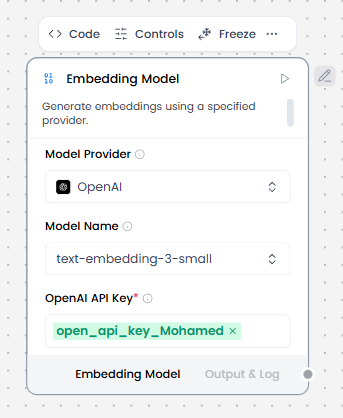
When/how the component should be used:
- Use when you need to convert text into vectors for similarity search or semantic matching
- Use before vector storage, similarity search, clustering, or retrieval.
- Required for indexing documents in Knowledge Base – Files
- Create a flow, add a Knowledge Base – Files component, and then select a file containing text data, such as a PDF, that you can use to test the flow.
- Add the Embedding Model core component, and then provide a valid OpenAI API key.
- Add a Split Text component to your flow. This component splits text input into smaller chunks to be processed into embeddings.
- Add a vector store component, such as the Chroma DB component, to your flow, and then configure the component to connect to your vector database. This component stores the generated embeddings so they can be used for similarity search.
- Connect the components
- Click Test Agent, and then enter a search query to retrieve text chunks that are most semantically similar to your query.
Connections with other components:
- Tool components (Chroma DB)
Configurable settings:
- Model Provider
- Model Name
- OpenAi Api Key
Default settings:
- Model Provider
- Model Name
- OpenAi Api Key
Control Section:
- Model Provider
- Model Name
- OpenAI API Key
- Chunk Size
- Max Retries
- API Base URL
- Dimensions
- Chunk Size
- Request Timeout
- Max Retries
- Show Progress Bar
- Model Kwargs
Default values:
- Model Provider = OpenAI
- Model Name = text-embedding-3-small
- Chunk Size = 1000
- Max Retries = 3
Desired Behaviour:
- Batch embeddings where possible
- Consistent vector dimensionality
- No semantic modification of text