
What and how it can be used:
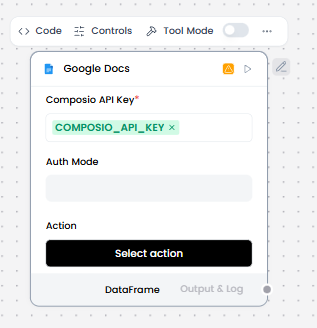
The Google Docs component connects to Google Docs via Composio so that agents can call Google Docs actions (like copying or modifying documents) using authenticated Google Workspace credentials. Authentication is handled through OAuth2 or a bearer token managed by Composio. It enables creating, reading, updating, formatting documents, managing document structure, inserting content, collaborating on documents, and integrating document operations into workflows.
When/how the component should be used:
- Use when an agent needs to interact programmatically with Google Docs, such as reading, copying, or updating a document, within a LangFlow flow.
- Ideal for report generation and documentation workflows
- How to use:
- Add the Gmail component to the flow.
- In the Composio API Key field, enter your Composio API key or use the COMPOSIO_API_KEY global variable.
- If the key is valid, the Alert is replaced by a Success indicator, and the Actions list populates with actions available to your API key.
- In the component’s header menu, enable Tool Mode.
- In the Actions list, configure the Gmail actions that you want to provide to the agent. You can select the actions you want to allow, and you can edit each action’s slug (agentic label) and description, which help the agent decide which tools to use.
- Connect the Gmail component’s Toolset output to the Agent Core component’s Tools input.
- In the Agent Core component, enter your OpenAI API key or configure the Agent component to use a different LLM.
- Connect Chat Input component to the Agent Core component’s Input port.
- Connect the Agent Core component’s Output port to the Chat Output component, which returns the final response to the user or application.
Connections with other components:
- Chat Output
- Batch Run
- DataFrame Operations
- Parser
- Save File
- Split Text
- Type Convert
- Loop
- Notify
- ChromaDB
In tool mode:
- Agent Core
- Human-in-the-loop
Configurable settings:
- Composio API Key
- Action
Default settings:
- Composio API Key
- Action
Control Section:
- Composio API Key
- Action
- Entity ID
- Actions in tool mode
Default values:
- Entity ID = default
- Actions = GOOGLEDOCS_COPY_DOCUMENT,
GOOGLEDOCS_CREATE_DOCUMENT,
GOOGLEDOCS_CREATE_DOCUMENT_MARKDOWN,
GOOGLEDOCS_CREATE_FOOTER,
GOOGLEDOCS_CREATE_FOOTNOTE
Desired Behaviour:
- Authenticate with Google Docs via Composio
- Only expose actions that are authorized by the user’s Google account
- Actions appear as tools to agents when enabled