
What and how it can be used:
The Google Meet component connects to the Google Meet API via the Composio toolkit using OAuth2 authentication. It exposes Google Meet actions as tools agents can call. This component enables creating, managing, and joining video meetings programmatically, scheduling virtual meetings, and integrating video conferencing capabilities into workflows.
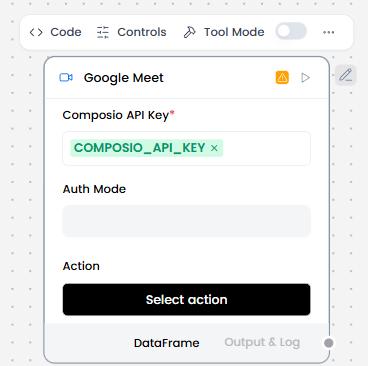
When/how the component should be used:
- Use when you want an agent to schedule, manage, or interact with Google Meet sessions (e.g., creating meeting links, listing scheduled meetings) as part of an automated workflow.
- Perfect for automated meeting creation with calendar integration
- Add the Google Meet component to the flow.
- In the Composio API Key field, enter your Composio API key or use the COMPOSIO_API_KEY global variable.
- If the key is valid, the Alert is replaced by a Success indicator, and the Actions list populates with actions available to your API key.
- In the component’s header menu, enable Tool Mode.
- In the Actions list, configure the Google Meet actions that you want to provide to the agent. You can select the actions you want to allow, and you can edit each action’s slug (agentic label) and description, which help the agent decide which tools to use.
- Connect the Google Meet component’s Toolset output to the Agent Core component’s Tools input.
- In the Agent Core component, enter your OpenAI API key or configure the Agent component to use a different LLM.
- Connect the Chat Input component to the Agent Core component’s Input port.
- Connect the Agent Core component’s Output port to the Chat Output component, which returns the final response to the user or application.
Connections with other components:
- Chat Output
- Batch Run
- DataFrame Operations
- Parser
- Save File
- Split Text
- Type Convert
- Loop
- Notify
- ChromaDB
In tool mode:
- Agent Core
- Human-in-the-loop
Configurable settings:
- Composio API Key
- Action
Default settings:
- Composio API Key
- Action
Control Section:
- Composio API Key
- Action
- Auth Mode
- Entity ID
- Actions in tool mode
Default values:
- Entity ID = default
- Actions = GOOGLEMEET_CREATE_MEET,
GOOGLEMEET_GET_CONFERENCE_RECORD,
GOOGLEMEET_GET_MEET,
GOOGLEMEET_GET_PARTICIPANT_SESSION,
GOOGLEMEET_GET_RECORDINGS_BY_CONFERENCE_RECORD_ID
Desired Behaviour:
- Use Composio to securely authenticate without exposing credentials.
- After connecting, show a list of available Google Meet actions (e.g., create a meeting, list conferences). These actions are callable by agents.
- The agent must explicitly choose and call actions, nothing runs automatically.