
What and how it can be used:
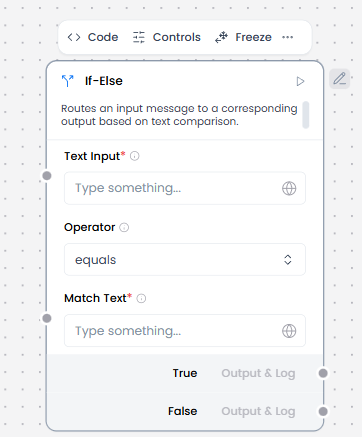
The If-Else component routes an input message to a corresponding output based on text comparison. It evaluates the input text against defined conditions and directs the flow to the matching output path. This component enables text-based conditional routing in workflows.
When/how the component should be used:
- Use when you need to route messages based on text content.
- Ideal for directing user messages to different handlers based on keywords.
- Add an If-Else component to your flow, and then configure it as follows:
- Text Input: Connect the Text Input port to a Chat Input component or another Message input.
- Match Text: Enter .*(urgent|warning|caution).* so the component looks for these values in incoming input. The regex match is case sensitive, so if you need to look for all permutations of warning, enter warning|Warning|WARNING.
- Operator: Select regex.
- Case True: In the component’s header menu, click Controls, enable the Case True parameter, click Close, and then enter New Message Detected in the field.
- The Case True message is sent from the True output port when the match condition evaluates to true.
- No message is set for Case False so the component doesn’t emit a message when the condition evaluates to false.
- Depending on what you want to happen when the outcome is True, add components to your flow to execute that logic e.g Language Model, Prompt Template & Chat Output.
- Repeat the same process with another set of Language Model, Prompt Template, and Chat Output components for the False outcome.
Connections with other components:
- Chat Output
- Text Input
- Text Output
- Agent Core
- API Request
- Directory
- News Search
- RSS Reader
- SQL Database
- Web Search
- Language Model
- Batch Run
- LLM Router
- Parser
- Python Interpreter
- Save File
- Smart Function
- Split Text
- Structured Output
- Type Convert
- Listen
- Notify
- Smart Router
- Calculator
- Anonymization
- Guardrail
- Human-in-the-loop
- Bing Search API
- Google Search API
- ChromaDB
Configurable settings:
- Text Input ( Write the text input or from another component )
- Operator ( Choose the operator)
- Match Text ( Write the match text )
Default settings:
- Text Input ( Write the text input or from another component )
- Operator ( Choose the operator)
- Match Text ( Write the match text )
Control Section:
- Text Input
- Operator
- Match Text
- Case Sensitive
- Case True
- Case False
- Max Iterations
- Default Route
Default values:
- Operator = equals
- Case Sensitive = on
- Max Iterations = 10
- Default Route = false_result
Desired Behaviour:
- Only one branch runs.
- Conditions must be true/false.