
What and how it can be used:
The MCP (Model Context Protocol) Tools component connects to an MCP server to use its tools. It establishes connections to MCP servers, discovers available tools, invokes tool operations with parameters, handles tool responses, and integrates MCP tool capabilities into workflows. This component enables seamless integration with any MCP-compliant server to extend functionality through standardized tool protocols.
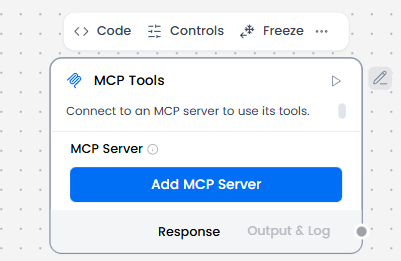
When/how the component should be used:
- Use when an agent needs external capabilities or to use local agents as tools.
- When you want to connect external MCP servers to your Langflow flow and allow agents to use tools from the MCP servers.
- When you want to use Langflow flows from other projects as tools.
- Create an MCP Server.
- Select the tools(flows) you want to use on Actions.
- Connect to Agent Core: MCP Tools must be exposed to an agent that can decide when and how to call them.
Connections with other components:
- ChatOutput
- Batch Run
- DataFrame Operations
- Parser
- Save File
- Split Text
- Type Convert
- Loop
- Notify
- ChromaDB
In tool mode:
- Agent Core
- Human-in-the-loop
Configurable settings:
- MCP Server
Default settings:
- MCP Server
Control Section:
- MCP Server
- Use Cached Server
Desired Behaviour:
- Make tools available.
- Clear input/output for each tool.
- Show clear errors when one of the tools is failing and identify which one.