
What and how it can be used:
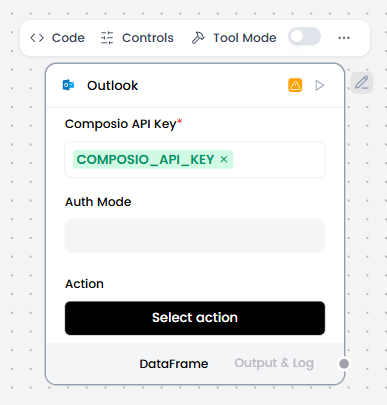
The Outlook component connects to a user’s Microsoft Outlook account via Composio, enabling agents or flows to read and send emails, manage calendar events, and access mailbox data using delegated authentication. It provides programmatic access to email operations (send, read, search, delete), calendar management (create events, check availability, manage meetings), contact management, and task operations. This component enables seamless integration with Microsoft 365 for email and productivity automation.
When/how the component should be used:
- Use when you need to automate Outlook email operations.
- Ideal for email-based workflows and notifications.
- Best for calendar scheduling and meeting management.
- Use when a flow or agent needs to interact with a user’s Outlook email or calendar.
- Add the Outlook component to the flow.
- In the Composio API Key field, enter your Composio API key or use the COMPOSIO_API_KEY global variable.
- If the key is valid, the Alert is replaced by a Success indicator, and the Actions list populates with actions available to your API key.
- In the component’s header menu, enable Tool Mode.
- In the Actions list, configure the Outlook actions that you want to provide to the agent. You can select the actions you want to allow, and you can edit each action’s slug (agentic label) and description, which help the agent decide which tools to use.
- Connect the Outlook component’s Toolset output to the Agent Core component’s Tools input.
- In the Agent Core component, enter your OpenAI API key or configure the Agent component to use a different LLM.
- Connect the Chat Input component to the Agent Core component’s Input port.
- Connect the Agent Core component’s Output port to the Chat Output component, which returns the final response to the user or application.
Connections with other components:
- Chat Output
- Batch Run
- DataFrame Operations
- Parser
- Save File
- Split Text
- Type Convert
- Loop
- Notify
- ChromaDB
In tool mode:
- Agent Core
- Human-in-the-loop
Configurable settings:
- Composio API Key
- Action
Default settings:
- Composio API Key
- Action
Control Section:
- Composio API Key
- Action
- Entity ID
- Auth Mode
- Actions in tool mode
Default values:
- Entity ID = default
- Actions = OUTLOOK_ADD_MAIL_ATTACHMENT,
OUTLOOK_CREATE_CALENDAR,
OUTLOOK_CREATE_CONTACT_FOLDER,
OUTLOOK_CREATE_EMAIL_RULE,
OUTLOOK_CREATE_MAIL_FOLDER
Desired Behaviour :
- Authenticate securely via Composio without exposing credentials.
- Only access scopes explicitly granted by the user.
- Execute email and calendar actions correctly.
- Fails if authentication expires or permissions are missing.