
What and how it can be used:
The Parser component extracts, transforms, and structures data from various formats (HTML, JSON, XML, CSV, PDF, etc.) into a usable format for the agent. It converts unstructured or semi-structured data into clean, organized information that can be processed by other components.
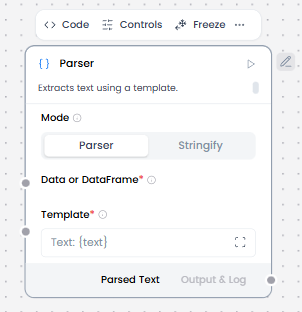
When/how the component should be used:
- Used to extract structured data from LLM output.
- For creating formatted text output using templates with variables.
- When converting structured data into natural language summaries.
- Connect Chat Input and Embedding Model to ChromaDB.
- Connect ChromaDB to the Parser.
- Edit the Parser component to set Mode to Parser.
- In the Parser’s Template field, enter a template to parse the raw payload into structured text.
- Connect the Parser component’s Parsed Text output to a Prompt Template which combines parsed retrieved context, user query and system instructions.
- Connect the Prompt Template to Language Model.
- Connect Language Model to Chat Output to display the responses.
Connections with other components:
- ChatOutput
- Text Input
- Text Output
- Agent Core
- API Request
- Directory
- News Search
- RSS Reader
- SQL Database
- Web Search
- Language Model
- Batch Run
- LLM Router
- Python Interpreter
- Save File
- Smart Function
- Split Text
- Structured Output
- Type Convert
- Listen
- Notify
- Smart Router
- Calculator
- Anonymization
- Guardrail
- Human-in-the-loop
- Bing Search API
- Google Search API
- ChromaDB
- If-Else
Configurable settings:
Mode : Parser
- Mode
- Template (Write the template)
- Data or dataframe ( From another component)
Mode : Stringify
- Mode
- Data or dataframe ( From another component)
Default settings:
Mode : Parser
- Mode
- Template (Write the template)
- Data or dataframe ( From another component)
Mode : Stringify
- Mode
- Data or dataframe ( From another component)
Control Section:
Mode : Parser
- Mode
- Template
- Data or dataframe
- Separator
- Clean Data
Mode : Stringify
- Mode
- Data or dataframe
- Separator
- Clean Data
Default values:
Mode : Parser
- Mode = Parser
- Template = Text: {text}
- Clean Data = on
Mode : Stringify
- Mode = Stringify
Desired Behaviour:
Mode : Parser
- Deterministic parsing rules
- Explicit errors, not silent failures
Mode : Stringify
- No data loss
- Stable ordering
- No semantic changes