
What and how it can be used:
The Prompt Template component creates structured, reusable instruction formats for AI agents. It allows you to define consistent prompting patterns with placeholders for dynamic variables, ensuring the agent receives well-formatted instructions every time while maintaining flexibility for different inputs.
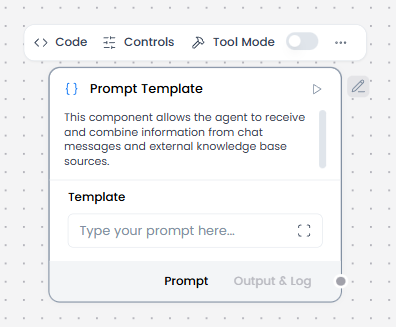
When/how the component should be used:
- When you want to separate prompt logic from the main agent configuration
- Use when you need consistent, structured prompts across multiple requests
- Best for creating reusable prompt patterns with variable inputs
- Ideal for standardizing how information is presented to the agent
- Define the template structure e.g. Summarize the following patient notes: {patient_notes}”
- Connect input sources e.g. Text Input, Text Output, Knowledge Base to ensure dynamic content is inserted into the prompt at runtime.
- Send to Language Model/Agent Core as output of the template becomes the prompt for a Language Model or Chat Output.
- Optionally, you could combine multiple templates for multi-step reasoning (e.g., one template for summarization, another for extraction).
Connections with other components:
- Chat Output
- Text Input
- Text Output
- Agent Core
- API Request
- Directory
- News Search
- RSS Reader
- SQL Database
- Web Search
- Language Model
- Batch Run
- LLM Router
- Parser
- Python Interpreter
- Save File
- Smart Function
- Split Text
- Structured Output
- Type Convert
- Notify
- Listen
- Smart Router
- Calculator
- Anonymization
- Guardrail
- Human-in-the-loop
- Bing Search API
- Google Search API
- ChromaDB
- If-Else
In tool mode:
- Agent Core
- Human-in-the-loop
Configurable settings:
- Template (Add the template)
Default settings:
- Template
Control Section:
- Template
- Tool Placeholder
- Actions in Tool mode
Default values:
- Actions = BUILD_PROMPT
Desired Behaviour:
- Fail clearly if variables are missing
- No hidden logic