
What and how it can be used:
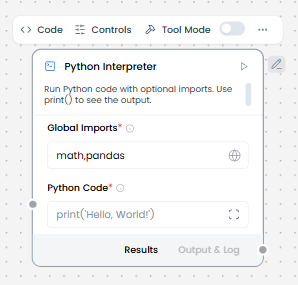
The Python Interpreter component executes Python code dynamically within the workflow, allowing for complex calculations, data processing, API calls, file operations, and integration with Python libraries. It provides a sandboxed environment to run Python scripts with input variables and return results to the workflow.
When/how the component should be used:
- Use when you need to execute Python code for complex logic or calculations
- Use for custom logic or calculations.
- Best for advanced data processing, statistical analysis, or machine learning operations
- Essential for integrating Python-specific libraries and tools into workflows
- To use this component in a flow, in the Global Imports field, add the packages you want to import as a comma-separated list, such as math,pandas. At least one import is required.
- In the Python Code field, enter the Python code you want to execute. Use print() to see the output.
- Optional: Enable Tool Mode, and then connect the Python Interpreter component to an Agent component as a tool. For example, connect a Python Interpreter component and a Calculator component as tools for an Agent component, and then test how it chooses different tools to solve math problems.
Connections with other components:
- ChatOutput
- Data Operations
- Parser
- Save File
- Smart Function
- Split Text
- Type Convert
- Notify
- ChromaDB
In tool mode:
- Agent Core
- Human-in-the-loop
Configurable settings:
- Global Imports ( write the imports)
- Python Code (write the code python)
Default settings:
- Global Imports ( write the imports)
- Python Code (write the code python)
Control Section:
- Global Imports
- Python Code
- Actions ( In tool mode)
Default values:
- Global Imports = math,pandas
- Python Code = print(‘Hello, World!’)
- Actions ( In tool mode) = RUN_PYTHON_REPL
Desired Behaviour:
- No network access unless enabled
- Time and memory bounded