
What and how it can be used:
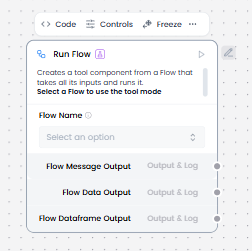
The Run Flow component creates a tool component from a Flow that takes all its inputs and runs it. It enables executing another workflow/flow as a reusable component, composing complex workflows from simpler flows, creating modular and maintainable automation, and calling flows with parameters. This component provides flow composition and reusability within workflows, turning any flow into a callable tool.
When/how the component should be used:
- Use when you need to execute another flow as part of a workflow.
- You can use this component to chain flows together, run flows conditionally, and attach flows to Agent components as tools for agents to run as needed.
- When you select a flow for the Run Flow component, it uses the target flow’s graph structure to dynamically generate input and output fields on the Run Flow component.
- Add the Run Flow component.
- Select the sub flow you want to run.
- Connect the sub-flow to process the input data.
- Output of the sub-flow is returned through the Run Flow component.
- Ensure that the sub-flow has clearly defined input/output contracts.
- Connect the output port of the Run Flow component to the next downstream component in your flow that you want to receive the results.
Connections with other components:
- Chat Output
- Text Input
- Text Output
- Agent Core
- API Request
- Directory
- News Search
- RSS Reader
- SQL Database
- Web Search
- Language Model
- Batch Run
- Data Operations
- DataFrame Operations
- LLM Router
- Parser
- Python Interpreter
- Save File
- Smart Function
- Split Text
- Structured Output
- Type Convert
- Listen
- Loop
- Notify
- Smart Router
- Calculator
- Anonymization
- Guardrail
- Human-in-the-loop
- Bing Search API
- Google Search API
- ChromaDB
- If-Else
Configurable settings:
- Flow Name
Default settings:
- Flow Name
Control Section:
- Flow Name
- Session ID
Desired Behaviour:
- Run the sub-flow in isolation.
- Clear inputs and outputs.