
What and how it can be used:
The Text Input component accepts a text string input and then passes it to other components as Message Data (a data object) containing only the provided input text string (i.e. text attribute). It’s designed for receiving processed text, static strings, prompts, or reference data from other components in the workflow.
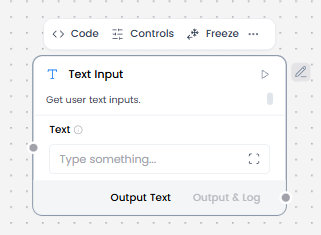
When/how the component should be used:
- Use for receiving text from other components in the workflow
- Does not interact with users directly
- Best when conversation history is not needed
- Use for static strings, prompts, reference data passed between components
- Feed into Prompt Template, Language Model, or Embedding Model.
Connections with other components:
- Chat Output
- Text Output
- API Request
- Directory
- News Search
- RSS Reader
- SQL Database
- Web Search
- Language Model
- Batch Run
- LLM Router
- Parser
- Save File
- Smart Function
- Split Text
- Structured Output
- Listen
- Notify
- Smart Router
- Chat Input
- Calculator
- Google Search API
- Bing Search API
- Human-in-the-loop
- Guardrail
- Anonymization
- ChromaDB
- If-Else
Configurable settings:
- Text
Control Section:
- Text
Desired Behaviour:
- Send text as-is (plain text strings only)
- No conversation metadata attached
- Does not change formatting.