
What and how it can be used:
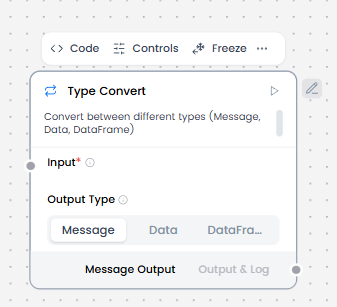
The Type Convert component transforms data from one type or format to another, ensuring compatibility between different components and proper data handling throughout the workflow. It converts values like strings to numbers, dates to timestamps, JSON to text, arrays to strings, and vice versa.
When/how the component should be used:
- If two components have incompatible data types, you can use a processing component like the Type Convert component to convert the data between components
- When transforming data from one of these formats to another
- When you need to pass data between components that expect different data types
Connections with other components:
- Chat Output
- Text Input
- Text Output
- Agent Core
- API Request
- Directory
- News Search
- RSS Reader
- SQL Database
- Web Search
- Language Model
- Batch Run
- LLM Router
- Parser
- Python Interpreter
- Save File
- Smart Function
- Split Text
- Structured Output
- Listen
- Notify
- Smart Router
- Calculator
- Anonymization
- Guardrail
- Human-in-the-loop
- Bing Search API
- Google Search API
- ChromaDB
- If-Else
Configurable settings:
- Input (From another component)
Default settings:
- Input (From another component)
Control Section:
- Input
- Auto Parse
- Output Type
Default values:
- Output Type = Message
Desired Behaviour:
- Explicit, loss-aware conversion