
Who are the users of the agents
Any staff.
What does the agent do
The purpose is to extract key information and perform triage recommendation based on patient information and guidelines, rules on triage. The agent can process multiple patient forms.
Input to the agent:
- Content: A health form as input to the agent contains all the information about the patient, which can be a health declaration form filled by patients, or a combination of patient filled form plus additional health and medical information pulled from medical journals, lab reports, etc.
- Where to input: If using default architecture, the input is in the form of a pdf file, you can upload the file to the ‘Knowledge Base – File’ component
Reference document for the agent: One file containing guidelines, rules used by the agent in doing the triage, also the key information to be extracted from the input patient health form. The instruction of where to upload this file can be found in the how to set up section.
The output of the agent:
- Content: An output result comprises key information extracted from the patient form, and triage suggestions along with the supporting reasons. It is in the format of a table.
- Where to output: it creates a new google sheet file of which the file name is unique by using the time stamp at the time of the creating the name and then it saves the results of the forms into the google sheet.
- Inform: at the end of the process, it emails to a pre-specified email address about the file name and total number of the forms that have been processed.
Optional: a conceptual diagram depicting the agent
What are need to setup the agent
- Composio API key for google sheet, and gmail tools
- Document(s) describing rules and instructions to perform triage, and specification of key information to be extracted from the forms.
How can you setup and customise the agent
Basic
You can follow the below steps.
- Enter Composio API key to the below two components
- Google Sheets
- Gmail
- Provide an email address where the agent emails the final result alert.
- Upload your file that contains definition of key information you wish to extract and the instructions or rules for triage
- Locate the component called ‘Knowledge Base – Files’ that is connected to the component ‘Prompt Template’ and upload the reference document.
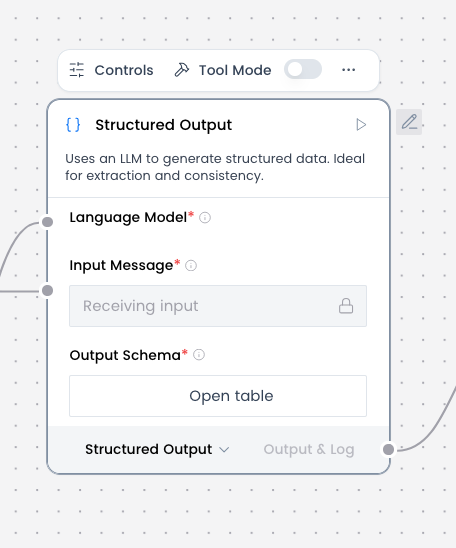
- Locate Structured Data (see below picture), click on ‘Open table’, then you add one by one all the key information items you wish to extract
Optional
If you wish to input your patient form via copy and paste in the chat interface, then you follow the below step:
- Locate the ‘Knowledge Base – Files’ component connected to ‘Split Text’, delete the ‘Knowledge Base – Files’ component
- Add Chat Input component next to the ‘Split Text’, connect the to the ‘Split Text’
How to run the agent
If you have the basic set up for agent, then you need to make sure to do below
- Create a file containing patient forms. And export it in pdf format.
- If you have multiple patient forms, make sure to insert a line containing only these five letter ‘xxxxx’ at the end of each patient form
Important notes
If you have multiple patient forms, you need to add the below line between the forms.
xxxxx