
Who the agent is for
Clinicians, clinical admins, and documentation teams who need to turn transcript PDFs into structured clinical summaries, and optionally land each summary in the patient’s EHR record.
What does the agent do
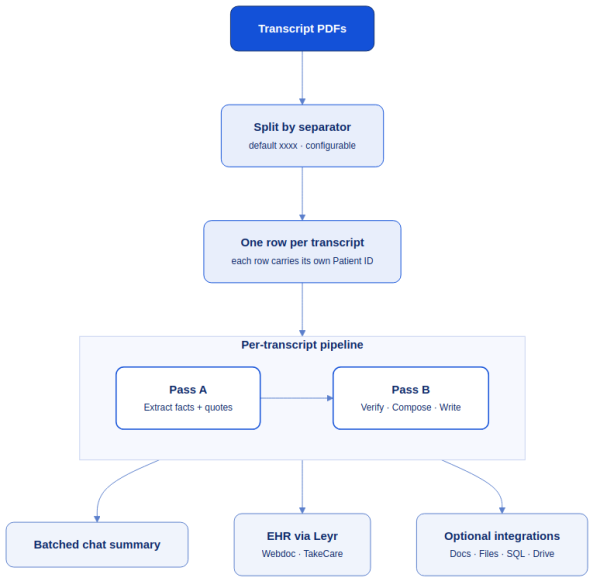
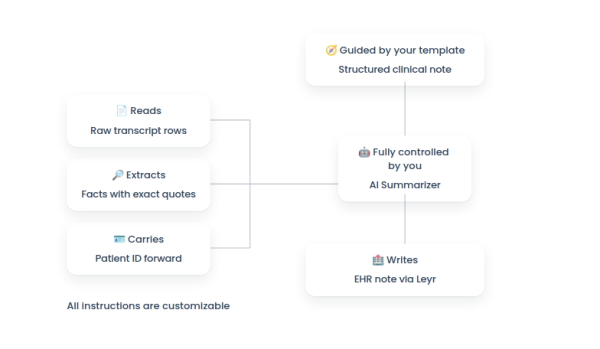
Turns transcript PDFs into structured clinical summaries, optionally written into Webdoc or TakeCare via Leyr. Each transcript record inside a PDF is processed independently using a two-pass extract-then-verify design that keeps the output grounded in the actual transcript text.
For every record the agent:
- Extracts atomic facts with exact verbatim quotes (Pass A).
- Verifies those facts against the transcript and drops any that are misquoted or inaccurate (Pass B).
- Auto-selects a summary template based on the detected visit type.
- Composes the final summary from verified evidence only.
- Writes the note into the EHR through Leyr, if connected.
- Returns a final batched summary in chat.
Use when: transcripts are moderate length and you want a reusable team template.
Avoid when: the source is raw audio, or you need cross-document synthesis.
What you need to setup the agent
- Transcript PDFs (one or many records per file)
- A separator between records inside each PDF (default xxxx, configurable)
- A patient personnummer in the header of each record, if you want EHR writing to work for that record
- Summary templates in TextInput – Summary Templates (psychology and primary care visit are pre-filled)
- (Optional) Leyr client_id and client_secret for EHR writing
- (Optional) The pre-filled TextInput – Webdoc Instructions or TextInput – TakeCare Instructions (connect only one to Prompt B)
Setup in six steps
- Upload PDFs to Knowledge Base – Files.
- Set the separator in Split Text – Transcript Rows. Default is xxxx but you can use any literal string (—, === END OF VISIT ===, etc.). Keep chunk_overlap = 0 and chunk_size = 1. Single-transcript PDFs work fine with the default; the separator simply won’t appear.
- Edit summary templates in TextInput – Summary Templates if needed. The agent auto-picks the right template per transcript from the detected visit type, so you only define content.
- Encode the personnummer in every transcript header. This is critical for EHR integration of the final summary for each transcript: each record between separators must include the personnummer of the patient that record is about. If a personnummer is missing, the summary is still produced but the EHR write for that record is skipped.
- Dry-run without EHR writes first. Leave the Leyr EHR component disconnected from Agent B. You will still get full per-transcript summaries and the final batched chat output. Connect Leyr once you are happy with quality.
- Enable EHR integration when you’re ready to write notes (full details in EHR integration (optional)):
- Add Leyr client_id and client_secret to the Leyr EHR component.
- In your Leyr account, create an application and enable the EHR(s) you want to target (Webdoc, TakeCare). Then click Refresh on the Leyr EHR component so the EHR provider dropdown picks up your newly-enabled options.
- Select the appropriate EHR (webdoc or takecare) from the dropdown.
- Connect the matching instruction block (TextInput – Webdoc Instructions or TextInput – TakeCare Instructions) to Prompt B’s {ehr_write_instructions} input. These blocks describe the EHR-specific integration requirements (care_unit_id, created_by_id, template_id, patient ID format) and are pre-filled. Connect only one at a time.
- Enable EHR integration when you’re ready to write notes (full details in EHR integration (optional)):
- Review the result in ChatOutput – Final Batched Summary.
Per-transcript isolation
Every record between separators is a fully independent unit: its own patient ID, visit type, template, verification, and EHR write. A bad record cannot leak content or patient ID into any other record in the batch. The PDF boundary is not the batching unit; the separator is.
EHR integration (optional)
Skip if you only need chat output.
- Create an account in Leyr and register an application to fetch the credentials (refer to the links below)
- Enter client_id and client_secret on the Leyr EHR component.
- Pick webdoc or takecare in the dropdown.
- Connect only one instruction block to Prompt B’s {ehr_write_instructions}: Webdoc or TakeCare. Never both.
- Leave the patient ID alone in the prompt; it is auto-injected from each transcript header. Webdoc gets the se_personal_number: prefix automatically; TakeCare gets the personnummer directly.
Leyr docs: Create account · Getting started · Sandbox · EHR setup
Test patients
Pre-provisioned in both TakeCare and Webdoc:
| # | Name | Patient ID / Personnummer |
|---|---|---|
| 1 | Tolvan Lennartsson | 191212121212 |
| 2 | Demo Bengtsson | 197110021834 |
| 3 | Ville Visningsson | 194010126672 |
| 4 | Ettan Andersson | 195003042222 |
Just put the personnummer in the transcript header; EHR-specific formatting is handled for you.
Other output options
Keep the default chat output, or add:
- Google Docs,
- Save File (txt/json/csv/xlsx/md),
- SQL Database,
- or Google Drive as a source/destination.
Important notes
- Transcript PDFs only, not raw audio.
- The separator is configurable; match what your PDFs already use.
- Every transcript record needs its own personnummer for that record’s EHR write to succeed.
- Connect one EHR instruction block at a time, never both.
- Always dry-run with Leyr disconnected before enabling live writes in a clinical environment.