
What and how it can be used:
The Anonymization component removes, masks, or replaces personally identifiable information (PII) and sensitive data from text, documents, or datasets to protect privacy and ensure compliance with regulations like GDPR, HIPAA, and CCPA. It detects and transforms sensitive information while maintaining data utility for analysis or processing.
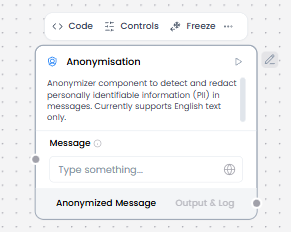
When/how the component should be used:
- Use when handling personal or sensitive data that needs privacy protection.
- Use when processing data that contains personally identifiable information (PII) before sharing or storing.
- Connect data containing sensitive information to the Anonymisation component input.
- Configure which fields or data types should be anonymized (e.g., names, emails, phone numbers, addresses).
- Connect the anonymized output to downstream components for further processing or storage.
- Verify that sensitive data has been properly anonymized before sharing or logging
Connections with other components:
- ChatOutput
- Text Input
- Text Output
- Agent Core
- API Request
- Directory
- News Search
- RSS Reader
- SQL Database
- Web Search
- Language Model
- Batch Run
- LLM Router
- Parser
- Python Interpreter
- Save File
- Smart Function
- Split Text
- Structured Output
- Type Convert
- If-Else
- Listen
- Notify
- Smart Router
- Calculator
- Guardrail
- Human-in-the-loop
- Bing Search API
- ChromaDB
Configurable settings:
- Message (From Guardrail)
Default settings:
- Message (From Guardrail)
Control Section:
- Message
- Personally Identifiable Information
Default values:
- Nothing
Desired Behaviour:
- Replace PII with placeholders and Maintain message meaning