
Integrate the API
On this page
You can connect a deployed agent without writing the integration by hand. Give the prompt below to an AI coding assistant such as Claude Code, Codex, Lovable, or Cursor. Developers who prefer to integrate by hand can skip to the Runtime API reference below.
Both paths use a deployment API key. The key identifies the deployment and grants access to it.
Get your deployment API key
- Open Manage deployment on your agent.
- Open Access.
- Create a deployment API key and give it a name that identifies the app or server using it.
- Copy the key when Arkus shows it.
- Store it in your app's server-side secret manager.
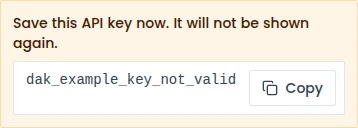
Arkus shows the full key once. If you lose it, create a new key and revoke the old one. Cached authorization can keep a revoked key working for about 60 seconds.
Never put the key in browser code, a mobile app bundle, source control, logs, errors, or responses.
Connect with an AI coding assistant
Before you paste the prompt, collect two values from Manage deployment → Integrate this agent: your base URL (the host at the start of each endpoint, such as https://your-workspace.arkus.ai) and the deployment address, called the slug in API requests (the value after /agents/ in the Create session endpoint). Create the deployment API key separately under Access.
Replace the values in angle brackets, then paste this prompt into your coding assistant:
Connect my Arkus AI deployment to <describe my app and stack>.

Inputs
- Base URL: https://<arkus-host>
- Deployment slug: <slug>
- Server-side API key variable: ARKUS_DEPLOYMENT_API_KEY

Implement this on the server:
1. Create a session with POST /runtime/v1/agents/<slug>/sessions using the x-api-key header. Save the returned id.
2. Send {"text":"<message>"} to POST /runtime/v1/sessions/<session-id>/messages and read the text/event-stream response.
3. Use an SSE parser. If your stack does not provide one, buffer response chunks across reads and parse only complete lines. Parse lines that start with data: as JSON {"event","data"}. Ignore comment and blank lines. add_message upserts by data.id; token appends data.chunk; error shows a safe error; end finishes the response.
4. If the stream disconnects before end, recover messages with GET /runtime/v1/sessions/<session-id>/messages.

Keep the API key out of browser code, logs, errors, and responses. Set a request timeout. Check non-2xx responses before parsing the stream, and read retry codes from detail.code. Send only one message at a time for each session. A concurrent message returns session_turn_in_progress; wait for the active stream to finish before accepting another message. Do not retry failed_auth_throttled; it means the key or authentication setup is wrong. Only retry rate_limit_exceeded and deployment_at_capacity, at most twice, honoring Retry-After when present. Do not automatically retry 5xx responses because the request outcome may be unknown.

Use /runtime/v1/openapi.json as the source of truth. Return the implementation, environment setup, and a short verification procedure.
Review the generated code before you use it. Check that every request runs on the server and reads the key from ARKUS_DEPLOYMENT_API_KEY.
What your app sends and receives
Your app first creates a session for the deployed agent. It saves the returned session ID on the server.
It then sends a message such as:
{ "text": "Summarize the main cautions in this clinical guideline." }
The reply arrives as a stream. Your app can show text as the agent produces it instead of waiting for the full answer.
If the connection drops before the end event, your server can fetch the saved messages for that session and restore the conversation state.
When something goes wrong
| What happened | What to check |
|---|---|
The request returns 401 | The x-api-key header is missing or empty. Confirm that the server sends a value. |
The request returns 404 | Check the deployment slug, session ID, and server-side key. A non-empty invalid or revoked key, a paused or deleted deployment, and an unknown item return the same response. |
| The message is rejected | Send a non-empty text value. |
| Another message is still running | Wait for the active stream to finish before sending another message to that session. |
| The request is rate limited | Wait for Retry-After when the response includes it. |
| The deployment is paused or deleted | The request returns 404. Resume the deployment, or deploy the source agent again if it was deleted, then try again. |
| The deployment is out of credits | The stream opens, then sends an error event. Add credits, then try again. |
| The stream disconnects | Fetch the session messages before deciding whether to send the message again. |
Do not show raw service errors to the person using your app. Log only safe context and never log the deployment API key or patient information.
Runtime API reference
This section is for developers who want the exact request and stream contract.
Authentication
Send the deployment API key with every session and message request:
x-api-key: <deployment-api-key>
Keep this header on the server.
Create a session
POST /runtime/v1/agents/{slug}/sessions
x-api-key: <deployment-api-key>
A successful request returns 201 Created. Save the id from the JSON response.
List sessions
GET /runtime/v1/agents/{slug}/sessions
x-api-key: <deployment-api-key>
A successful request returns the sessions that this deployment API key owns for the agent.
Send a message
POST /runtime/v1/sessions/{session_id}/messages
x-api-key: <deployment-api-key>
Content-Type: application/json
Accept: text/event-stream

{"text":"Summarize this report for a clinical reviewer."}
The text value must contain between 1 and 100,000 characters. A successful request returns a text/event-stream.
Each data frame contains JSON with an event and data value:
| Event | Client action |
|---|---|
add_message | Add or update the message using data.id. |
token | Append data.chunk to the reply being displayed. |
error | Stop normal rendering and show a safe error. |
end | Finish the reply. |
The stream starts with a comment frame, which clients can ignore. A completed stream ends with end.
Only one message can run in a session at a time. A concurrent request returns 409 with:
{
  "detail": {
    "code": "session_turn_in_progress",
    "reason": "A message is already being processed for this session."
  }
}
Wait for the active stream to finish before sending the next message.
Recover session messages
GET /runtime/v1/sessions/{session_id}/messages
x-api-key: <deployment-api-key>
Use this after a stream disconnects before end. The response contains the messages saved for that session.
Delete a session
DELETE /runtime/v1/sessions/{session_id}
x-api-key: <deployment-api-key>
A successful request returns 204 No Content.
OpenAPI document
GET /runtime/v1/openapi.json
This document does not require a deployment API key. Use it as the source of truth for request and response schemas.
Response guide
| Status | Meaning | Client action |
|---|---|---|
401 | The API key header is missing or empty. | Check that the server sends a non-empty x-api-key value. |
404 | The non-empty key is invalid or revoked; the slug or session is unknown; the key cannot access it; or the deployment is paused or deleted. | Check configuration. Do not probe for other identifiers. |
422 | The message body is invalid. | Correct the body before retrying. |
429 with failed_auth_throttled | Too many invalid authentication attempts came from one address. | Fix the key or authentication setup. Do not retry automatically. |
429 with rate_limit_exceeded | This consumer sent too many messages. | Retry at most twice and honor Retry-After. |
429 with deployment_at_capacity | The deployment reached its configured simultaneous-run limit. | Retry at most twice and honor Retry-After when present. |
409 with session_turn_in_progress | Another message is still running in this session. | Wait for the active stream to finish before sending another. |
409 | The deployment or one of its saved connections needs an update. | Correct the deployment configuration before retrying. |
503 | A required service is temporarily unavailable. | Show a safe error and check the deployment before retrying. |
By default, 10 failed authentication attempts within 60 seconds trigger a 300-second throttle. The message limit is 60 messages in 60 seconds for one deployment consumer. Simultaneous-run limits exist, but their default value is 0, which leaves them disabled and unlimited unless your environment configures them.
Do not automatically retry 5xx responses because the request outcome may be unknown. A repeated request can create duplicate work.
Where to go next
- Deploy & manage to manage versions, status, and billing.
- Monitor & troubleshoot to diagnose compatibility, logs, and limits.