
Structured Output
On this page
Purpose
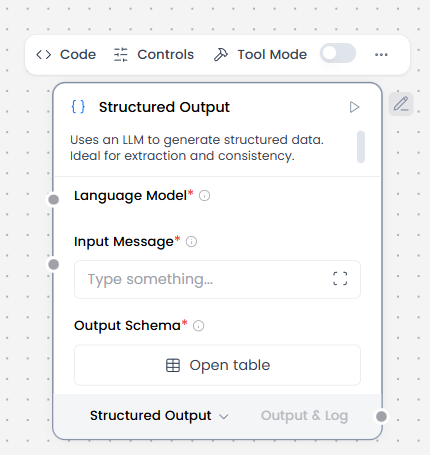
Structured Output asks a connected language model to extract typed fields from a Message. It can return Data or a one-row-per-record DataFrame.
When to use it
- Extract records from unstructured text.
- Produce fields for Data Operations or a DataFrame workflow.
- Return a schema-shaped result from a model-backed flow.
Required setup
Connect a compatible Language Model. The model must support structured output.
How to use it
Tool Mode
- Connect Language Model and define the fixed Output Schema.
- Enable Tool Mode and connect Toolset to Agent Core.
- Let the agent supply Input Message while the model, schema, and instructions remain fixed.
- Test an input with missing or ambiguous fields.
Normal mode
- Connect Language Model to Language Model.
- Connect the source text to Input Message.
- Define field names, descriptions, types, and As List behavior in Output Schema.
- Choose the active Structured Output port for Data or DataFrame.
Configuration
| Setting | What it controls | Recommended starting point |
|---|---|---|
| Language Model | The model used for extraction. | Connect a model that supports structured output. |
| Input Message | Source text for extraction. | Keep the input focused on one extraction task. |
| Output Schema | A table of field definitions for the result. Each row has Name, Description, Type, and As List. | Start with one or two simple fields. |
| Format Instructions | Adds extraction instructions for the model. | Change only when domain rules need to be explicit. |
| Schema Name | Names the generated outer model. | Leave blank unless clearer traces are needed. |
In the Output Schema table, Type is str, int, float, bool, or dict, so use the narrowest useful type. As List makes that field a list of its Type, such as tags or phone numbers. Type and As List are columns of each row, not separate settings on the component.
Expected result
A single extracted record becomes Data. Multiple records are wrapped under results. DataFrame output uses one row per extracted record. As List changes one field's type, not the number of extracted records.
The Builder activates one of the two output ports at a time: structured_output for Data or dataframe_output for DataFrame. The component can fail when the model lacks structured-output support, the schema is empty, or the final result is empty or unexpected.
Reference details
The prompt asks for nulls and duplicate removal, but those are model instructions, not guaranteed post-processing.
Provider credentials and credits
Structured Output has no credential of its own. Its provider credentials and credit behavior come from the connected Language Model. Do not put keys in the message, schema, or format instructions.
Related components
- Language Model supplies the configured model object.
- Data Operations processes Data output.
- DataFrame Operations processes DataFrame output.