
Deploy & manage
On this page
Each deploy creates a frozen version of your agent. Your live version stays unchanged while Arkus prepares and checks a new one.
Before you deploy
Check these items first:
- Your agent is saved and works with the inputs you expect.
- Its connections lead to the right components.
- It does not use a component listed as unsupported in Monitor & troubleshoot.
- You can confirm any saved credentials that the agent needs. Arkus checks credential references before a version can go live.
Deploy your agent for the first time
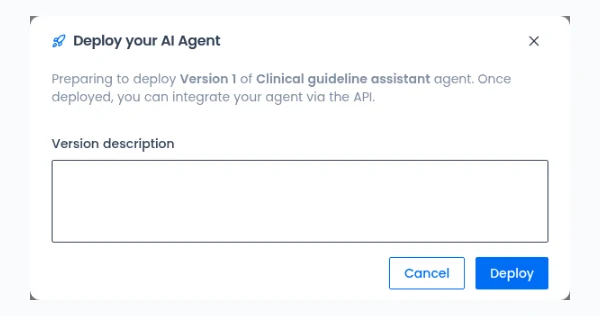
- Open the agent in the builder and select Deploy.
- Add an optional version description. Use it to record what this version changes.
- Review any notice in the deploy dialog. Save the agent or correct a blocking issue before you continue.
- Select Deploy.
- Wait while Arkus prepares the version and checks that it can run.
Arkus creates a permanent address for the deployment. You cannot edit or reuse this address later.
Publishing happens in the background. The deployment opens after the first version is ready. Nothing goes live unless the version passes its runtime compatibility check.
Redeploy after a change
Editing the source agent does not change the version that consumers use.
To publish your changes:
- Save and test the source agent.
- Open Manage deployment.
- Select Redeploy.
- Add an optional release note and confirm the deploy.
The current version keeps serving requests while Arkus prepares the new one. The new version becomes active after it passes the compatibility check.
Files and knowledge are copied into each version. Redeploy after changing them, even when the builder does not show another unpublished change.
View versions and roll back
Version history shows each frozen version and its description, date, and status.
To return to an earlier version:
- Open the deployment's version history.
- Choose a ready version.
- Select Restore and confirm.
Arkus checks the selected version against the current runtime before it activates it. Restoring a version does not change your editable source agent, so you can keep working and deploy again later.
Retry a failed deploy
A failed version never replaces the active version.
Open the failed version and select Redeploy to run the same frozen version through preparation again. If it still fails, use the failure details and deployment logs to correct the source agent, then redeploy. See Fix a deploy that will not go live.
Pause and resume
Pause a deployment when you need to stop new runtime requests without deleting it. In-flight replies finish, and the pause takes effect within about a minute.
While paused, the Runtime API is unavailable for that deployment. Resume it when you are ready to accept requests again. Resuming also takes effect within about a minute.
Delete a deployment
Deleting removes the deployment and its active address. It does not delete the editable source agent. This action cannot be undone.
The deployment address is retired permanently. You can deploy the source agent again, but the new deployment receives a different address.
Review any app or system that uses the address before you delete it. Cached authorization can keep working for about 60 seconds after deletion. The same window applies after you revoke a deployment API key.
Usage and billing
The deployment owner pays for model, embedding, and other metered work used by deployed runs.
Use Usage overview to check conversations, messages, credits, tokens, errors, and response time. These totals help you understand use without exposing message content. Consumer transcripts are not available.
When the credit balance reaches zero, the Runtime API refuses new billable work. Add credits to make it available again.
Where to go next
- Integrate the API to create a deployment API key and connect your app.
- Monitor & troubleshoot to check compatibility, logs, and common failures.