
Fitbit
On this page
Purpose
Fitbit connects the current Arkus user's account through Google Health OAuth and reads profile, activity and fitness, health metrics and measurements, hydration, or sleep data.
Beta: The Fitbit integration is in beta while Arkus actively tests the Google Health connection. Google has not verified the Arkus OAuth app, so account connection may show a warning.
It is read-only. It does not write Fitbit data, follow provider pagination, retrieve food or macronutrient logs, or provide medical advice.
When to use it
- Summarize steps, distance, exercise, floors, or active minutes over a date range.
- Review heart rate, resting heart rate, weight, body fat, oxygen saturation, or height records.
- Compare sleep sessions and available sleep summaries.
- Retrieve hydration records, returned by Get Nutrition, for a wellness check-in.
- Give Agent Core user-authorized fitness tools for a coaching conversation.
Required setup
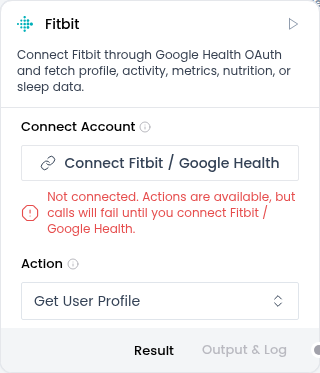
- Click Connect Account.
- If Google shows Google hasn't verified this app, confirm that you started the connection from Arkus and that the screen identifies
hello@arkus.aias the developer. - Click Advanced, then Go to Arkus AI (unsafe) or Proceed anyway. Google may use different wording.
- Review the requested access and complete consent.
Do not continue if you did not start the connection from Arkus or the screen identifies a different developer.
Fitbit results can contain sensitive identity and health data. The component does not redact them. Treat downstream prompts, traces, and outputs accordingly.
How to use it
In Tool Mode:
- Connect the component's tools to Agent Core.
- Ask the Agent to call the profile tool first to confirm the connection.
- Give the Agent a bounded task, such as summarizing sleep sessions for one week.
- Set both Start Date and End Date when the workflow needs a date range.
The profile tool takes no arguments. Grouped tools accept optional dates and page size.
In Normal mode:
- Start with Get User Profile.
- Choose Get Activity and Fitness, Get Health Metrics and Measurements, Get Nutrition, or Get Sleep.
- Leave both dates blank, or set both Start Date and End Date.
- Keep Page Size at 100 for the first run.
Configuration
| Setting | What it controls | Recommended starting point |
|---|---|---|
| Connect Account | Starts or repeats the user OAuth flow | Connect before the first live call |
| Action | The profile or grouped data category | Use Get User Profile to confirm the connection |
| Start Date and End Date | A date range for grouped actions | Leave both blank or set a bounded pair |
| Page Size | The provider page size for each data type | Keep the default of 100 |
A date-only End Date includes that calendar day. Page Size applies separately to each data type in a group, not to the total response.
Expected result
Profile returns the provider profile object. Grouped actions return category metadata, requested dates, results by data type, and any per-type errors.
One failed data type does not discard successful siblings. When a provider rejects an automatic date filter, the component retries that data type without the filter and marks the fallback. Treat that result as unbounded by the requested dates.
Reference details
Lower Page Size when the response is too large. Raise it only when one page is not enough. Use an explicit date range when the workflow must be bounded, and inspect fallback metadata before relying on that bound.
Use Data Operations to filter or reshape the structured result. Type Convert can adapt it for another downstream type.