
Health Questionnaire
On this page
Purpose
Health Questionnaire runs one standard health questionnaire as a multi-turn conversation. It asks one question at a time, validates each answer, and calculates the result after the last valid answer.
It is a tool-only component. Connect it to Agent Core to run the conversation. It does not provide a standalone form, diagnose a condition, recommend treatment, or contact a clinician or emergency service.
When to use it
- Add a standard screening questionnaire to an intake, check-in, or coaching conversation.
- Collect answers in a fixed order without asking a model to remember the questionnaire.
- Calculate the selected questionnaire's score with deterministic rules.
- Use the structured result in reviewed routing logic or to support a human decision.
Supported questionnaires
PHQ-9
PHQ-9 asks nine questions about depression symptoms during the last two weeks. The questions cover interest, mood, sleep, energy, appetite, self-worth, concentration, movement or restlessness, and thoughts of death or self-harm.
The component returns a score from 0 to 27 and one of these labels: Minimal, Mild, Moderate, Moderately severe, or Severe. It also marks scores of 10 or more as a positive screen.
PHQ-9 includes a self-harm question. The component records and scores the answer, but it does not trigger an alert or provide crisis support. Whenever PHQ-9 is used with real people, add a reviewed safety response for any answer other than Not at all to that question. Handle it separately from the total-score threshold.
GAD-7
GAD-7 asks seven questions about anxiety symptoms during the last two weeks. It covers nervousness, difficulty controlling worry, excessive worry, trouble relaxing, restlessness, irritability, and fear that something awful may happen.
The component returns a score from 0 to 21 and one of these labels: Minimal, Mild, Moderate, or Severe. It also marks scores of 10 or more as a positive screen.
BMI
BMI asks for weight in kilograms and height in centimeters. It calculates body mass index as weight divided by height in meters squared. The component has four configured interpretation bands: Underweight, Healthy weight, Overweight, and Obesity.
Weight must be between 1 and 500 kg. Height must be between 30 and 300 cm. Decimal values can use a period or comma.
The component does not ask for age or check whether its configured bands are appropriate for the person. Do not use these bands for children or teenagers. BMI is a screening measure, not a diagnosis, and does not distinguish fat, muscle, and bone mass.
AUDIT-C
AUDIT-C is the three-question alcohol consumption screen. It asks about drinking frequency, drinks on a typical drinking day, and how often the person has six or more drinks on one occasion.
The component returns a score from 0 to 12. It marks scores of 4 or more as a positive screen. This is one fixed default threshold. The component does not choose a different threshold based on sex, age, or clinical context.
AUDIT
AUDIT is the full ten-question alcohol screen. It includes the three AUDIT-C consumption questions, then asks about loss of control, missed responsibilities, morning drinking, guilt, memory loss, injury, and concern from other people. Questions four through eight refer to the last year. The injury and concern questions ask whether the event happened and distinguish events during the last year from earlier events.
The component returns a score from 0 to 40 and one of these labels: Low risk, Hazardous, Harmful, or Possible dependence. It also marks scores of 8 or more as a positive screen.
WHO-5
WHO-5 asks five questions about well-being during the last two weeks. It covers positive mood, calmness, energy, feeling rested, and interest in daily life.
The component returns the raw score from 0 to 25 and a displayed score from 0 to 100. It calculates the displayed score by multiplying the raw score by four. Higher scores mean better reported well-being. A raw score below 13 receives a screening flag.
Required setup
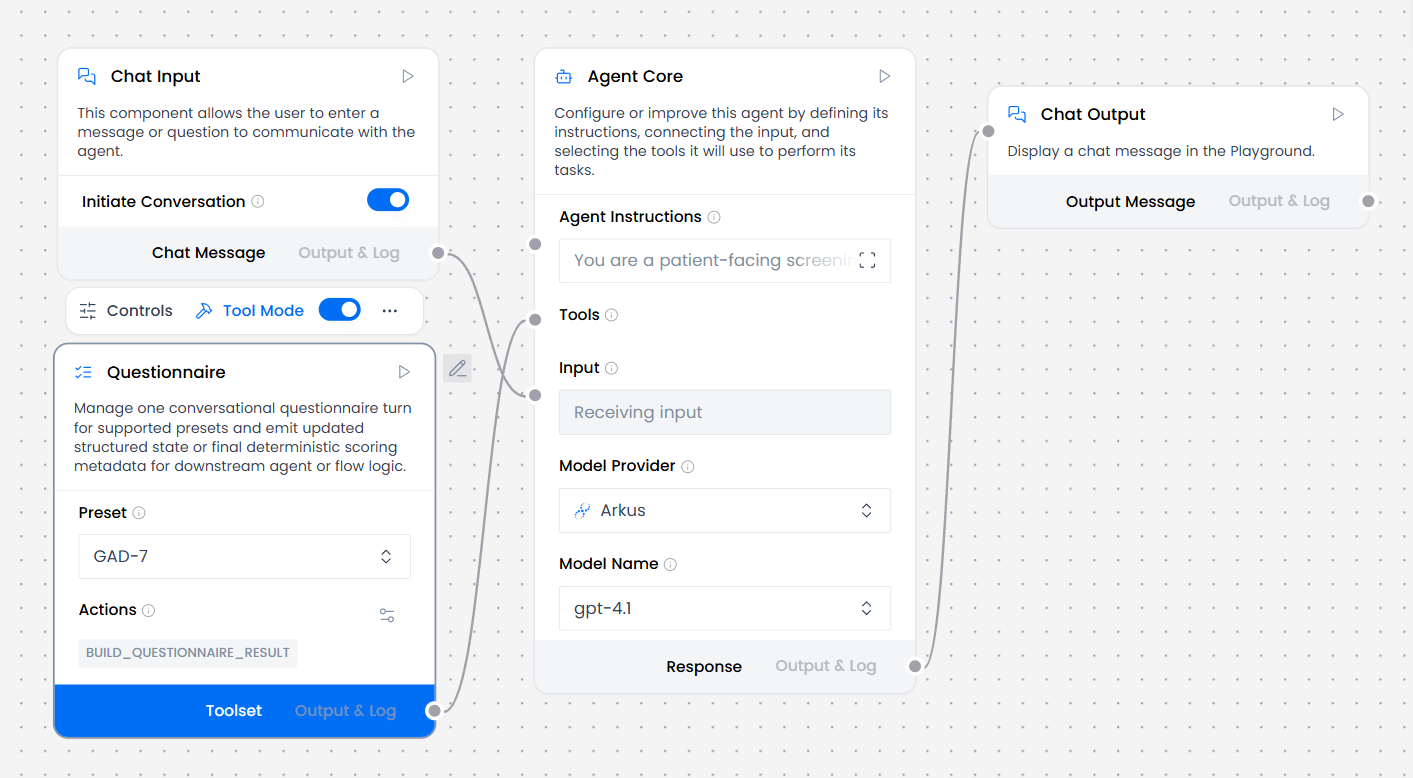
Choose a Preset, then connect Toolset to Agent Core's Tools. One Health Questionnaire node runs one preset. Add another node when the flow needs a second questionnaire.
For PHQ-9 and other health-related uses, define how the flow handles answers that need human or urgent review. Do not rely on the questionnaire's total score alone for that decision.
How to use it
- Add Health Questionnaire and choose the Preset.
- Connect Toolset to Agent Core Tools. Tool Mode is always on and cannot be disabled.
- Tell the Agent to call the tool with an empty answer to start, ask the returned question as written with its answer options, and call the tool again after every answer.
- Tell the Agent to pass the text of one allowed answer. For BMI, pass the numeric measurement in the stated unit.
- If an answer is unclear or invalid, have the Agent ask again. It must not guess, skip the question, or advance from chat memory.
- When the result is complete, stop asking questions and use the returned score, interpretation, and threshold information.
For example, a person may answer "a few days" to a PHQ-9 question. The Agent can map that to the exact allowed answer Several days when the meaning is clear. If the answer could match more than one option, the Agent should ask the person to choose from the allowed answers.
Configuration
| Setting | What it controls | Recommended starting point |
|---|---|---|
| Preset | The questionnaire to run: PHQ-9, GAD-7, BMI, AUDIT-C, AUDIT, WHO-5. | Select the questionnaire needed by the flow. PHQ-9 is the default. |
| Latest Answer | The answer the Agent passes for the current question. | Leave it empty in the node. The Agent supplies it at run time. |
| Prior State | Continues from a result or state token supplied by the flow. | Leave it unconnected unless the flow saves and restores state itself. |
| Session ID | Overrides the current flow session used for automatic continuation. | Leave it empty for normal chat flows. |
Prior State and Session ID are advanced settings. Most flows do not need them.
Expected result
Each tool call returns a short result with the questionnaire name and status. While the questionnaire is in progress, it also returns progress and the current question: its allowed answers, or the unit and range for a numeric question. An invalid answer adds the validation message. A complete result returns the score, interpretation, and any threshold flags that were met.
The status is:
in_progresswhile valid answers are still needed.invalidwhen the latest answer does not match the current question.completeafter every required answer is valid and the score is ready.unsupportedwhen the selected preset is not available.
An invalid answer does not move the questionnaire forward. The result repeats the same question and explains what was rejected.
While a questionnaire is in progress, the component keeps its state for the current chat session. With automatic session continuation and no explicit Prior State, a call with an empty answer starts over and clears the saved in-progress answers. The component also clears the saved state after completion.
Reference details
Choice questions accept the text of one option while ignoring capitalization, extra spaces, surrounding quotes, and a trailing period. They do not accept option numbers or arbitrary conversational text. Some AUDIT answers are themselves numbers, such as 3 or 4, so a bare number would be ambiguous. Agent Core should map a clear reply to one allowed answer and ask for clarification when the mapping is uncertain.
Scores, severity labels, and threshold flags are screening results. They are not diagnoses or treatment recommendations. A downstream Agent may explain the returned fields, but it should not present them as a clinical conclusion.
Answers and results can contain sensitive health information. Health Questionnaire does not redact them. Review any downstream model prompts, traces, storage, and displayed output before using the flow with real health data.
Related components
- Agent Core runs the conversation. Instruct it to call Health Questionnaire after each answer.
- Chat Input receives the person's replies.
- Chat Output displays each question and the final explanation.