
Leyr EHR Connector
On this page
Purpose
Leyr EHR Connector gives Agent Core ten tools for a selected Leyr-connected EHR. The tools cover care units, practitioners, services, appointments, timeslots, patients, and medical notes.
It is tool-only. It does not provide a normal data output for downstream data components.
When to use it
- Find a care unit, practitioner, service, and available timeslot before booking.
- Search for a patient before reading appointments or notes.
- Create a patient when the target EHR accepts the supplied fields.
- Read a page of notes or create an unsigned note from a Leyr template.
Required setup
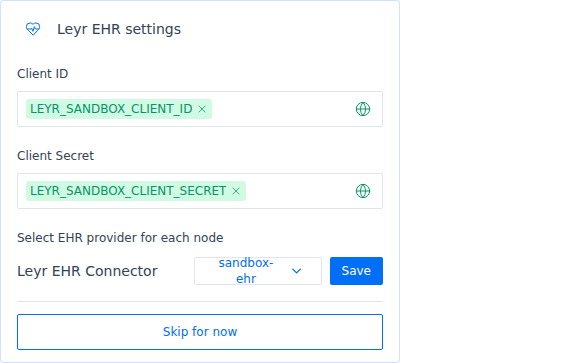
Create a Leyr application and connect the EHR integration you intend to use. In Arkus, create separate Credential entries for the Leyr Client ID and Client Secret.
For deployed flows, select saved Arkus Credentials. Typing values into the node can validate the editor setup but does not meet the deployment requirement.
How to use it
- Add Leyr EHR Connector and select the two saved Credentials.
- Validate the credentials, then select a healthy EHR Provider.
- Connect its Tool output to Agent Core Tools.
- Start with discovery and read actions. Add booking, patient creation, or note creation only after the workflow has the required IDs, authorization, and review controls.
A typical booking sequence is: list care units, find the patient, check timeslots, then book the appointment.
Configuration
| Setting | What it controls | Recommended starting point |
|---|---|---|
| Client ID | Leyr application identity | Select a saved Arkus Credential |
| Client Secret | Leyr application secret | Select its matching saved Credential |
| EHR Provider | The Leyr integration injected into every tool call | Validate first, then choose a healthy sandbox or production integration |
The EHR list stays empty until the Client ID and Client Secret validate.
Expected result
Agent Core receives tools to list care units, resources, services, appointments, timeslots, patients, and notes, plus tools to book an appointment, create a patient, and create a note.
Successful calls return structured records. Provider and validation failures return sanitized messages. Booking, patient creation, and note creation write to the selected EHR. Created notes are unsigned.
For credential failures, check or rotate the saved Client ID and Client Secret, then validate again. Retry temporary provider failures after the provider or throttling condition clears. For request failures, correct the action arguments and run the step again.
Reference details
The node has no advanced controls. The tools accept only the IDs and filters needed for each action.
Use bounded timeslot windows. Medical-note reads return one page at a time with a pagination token. Leyr requests use a fixed 90-second timeout and do not retry automatically.
Leyr EHR Connector cannot update or cancel appointments, sign notes, upload documents, process payments, or call arbitrary Leyr endpoints. It does not establish consent, authority, target-EHR permissions, or regulatory compliance.
Use non-production records for write-path testing.