
Image Knowledge Base
On this page
Purpose
Image Knowledge Base gives Agent Core a curated set of images it can show with answers. You upload PNG or JPEG images and describe when each one is useful. The Agent uses those descriptions to choose relevant images.
It does not read text from images, search for images, or accept images uploaded during a chat.
When to use it
- Add diagrams, screenshots, forms, product images, or other visual references to answers.
- Show a relevant image beside a step in a routine, guide, or manual.
- Combine document-based answers with a small library of supporting images.
Required setup
Select at least one image, write a description for every image, and connect Toolset to Agent Core Tools. Keep the normal conversation path from Chat Input through Agent Core to Chat Output.
How to use it
- Add Image Knowledge Base and select the images.
- Open Descriptions and explain what each image shows and when it should appear.
- Connect Toolset to Agent Core Tools.
- Connect Chat Input to Agent Core, then connect the Agent response to Chat Output.
- Test a question that clearly matches one image, then test a question that should return no image.
Write descriptions that distinguish similar images. The Agent should skip an image when the match is unclear.
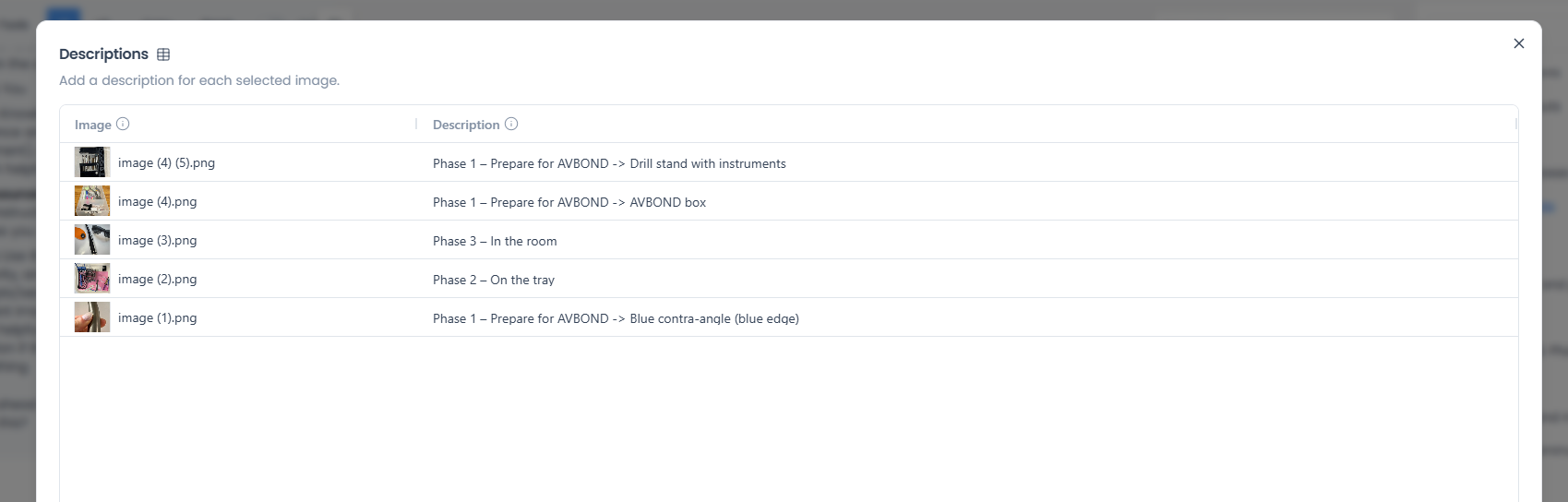 Image Knowledge Base descriptions table with thumbnails, filenames, and descriptions.
Configuration
| Setting | What it controls | Recommended starting point |
|---|---|---|
| Images | Selects the PNG or JPEG images available to the Agent | Start with a small set of images that serve distinct purposes |
| Descriptions | Explains what each image shows and when it is useful | Include the topic, situation, or step that should make the image relevant |
| Actions | Lists the two image tools the Agent receives and lets you enable or disable each one | Keep both enabled. Without both, the Agent cannot choose and show images |
The table rows follow the selected images. Removing an image removes its description row. A newly selected image starts with an empty description.
Expected result
Agent Core receives two tools from each Image Knowledge Base. The Agent first reviews the available image IDs and descriptions, then resolves only the images it selected. Relevant images appear beside the related answer text in Builder chat.
The Agent can return several images when each one clearly helps. If none of the descriptions match, the answer should remain text-only.
Reference details
You can add up to 30 images across all Image Knowledge Base components in a flow. Descriptions must be between 1 and 1,000 characters. Each file must be a valid PNG or JPEG and fit the upload limit shown in Builder, up to a maximum of 5 MB.
Server File Path appears among the advanced settings, but Image Knowledge Base does not use it. Select images with Images.
Selection uses the descriptions you write, not the image contents. Include enough context for the Agent to choose without guessing, but keep procedural instructions in Agent Core rather than in image descriptions.
Related components
- Agent Core chooses relevant images.
- Chat Output displays the Agent's answer in Builder chat.
- Knowledge Base - Files provides document text when an answer needs written source material.
- Chat Input accepts files supplied by the user during a chat.