
UI Block
On this page
Purpose
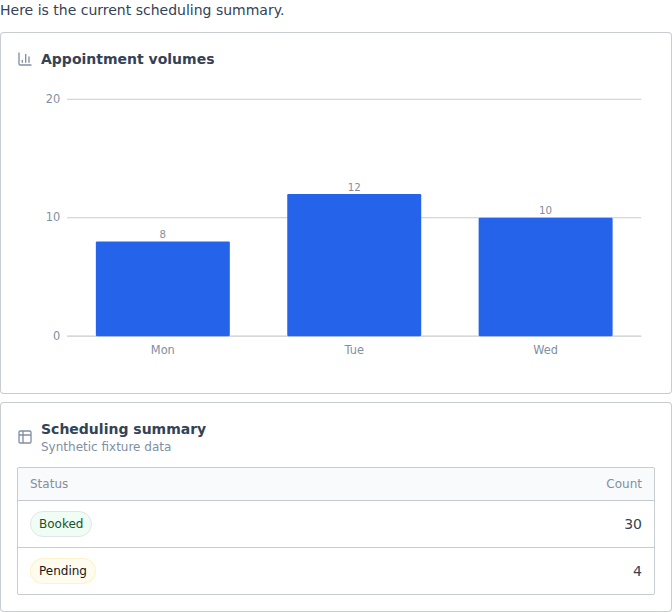
UI Block turns a message into typed inline UI in a Builder answer. It can render Record Cards, Metric Groups, Charts, Alerts, Summaries, Data Tables, and Flowcharts.
In a normal flow, a connected Language Model creates the blocks. In Tool Mode, an Agent calls emit_ui_block and places the returned token in its reply.
When to use it
- Show a chart or table when a text answer would be hard to scan.
- Present a record with labels, identifiers, and badges.
- Turn a status update into an alert or short summary.
- Draw a constrained process flow without allowing arbitrary HTML or custom code.
How to use it
In Tool Mode:
- Turn on Tool Mode and connect Toolset to Agent Core Tools.
- Connect the Agent response to Chat Output.
- Let the Agent call
emit_ui_blockwhen a chart, table, alert, or other supported block helps. - Place the returned token, such as
{{ui:weekly-steps}}, in the reply. A valid block without a token appears after the reply.
For example, an activity Agent can answer with a short summary and an inline weekly-steps chart.
In Normal mode:
- Connect a Message output to Input Payload and a Language Model to Language Model.
- Keep the block types you want under Components.
- Connect Generated Blocks to Chat Output.
Configuration
| Setting | What it controls | Recommended starting point |
|---|---|---|
| Input Payload | The Message that normal mode converts into UI | Connect short, well-structured text or data summaries |
| Language Model | The model used for structured block generation | Use a model that supports structured output |
| Components | The allowed block types | Start with one or two types, such as Chart and Data Table |
| Tool Mode | Replaces normal generation with the Agent tool | Use it only when the Agent should decide whether to show UI |
All seven block types are enabled by default. At least one must remain selected.
Expected result
Normal mode returns a Message with an optional introduction and ordered inline blocks. Tool Mode gives the Agent one emit_ui_block tool. The frontend validates the block shape before it renders.
Charts accept up to 200 rows and six series. Data Tables accept up to 100 rows and 12 columns. Flowcharts accept up to 40 nodes and 80 edges. UI Block does not store messages itself, although downstream Chat Output can store the message under its own settings.
In normal mode the payload text is sent to the provider behind the connected Language Model, and UI Block redacts nothing on the way. Keep secrets and unnecessary personal data out of it. Agent deployments reject flows that include UI Block.
Missing inputs, a model without structured output, an empty result, or invalid generated blocks return a bounded generation-failure message instead of UI content. An unknown block component or renderer error shows a safe notice that the block could not be displayed, without exposing raw block properties.
Reference details
Use Components to narrow the structured schema. For example, allow only Chart and Data Table for metrics work.
The block_id tool argument controls where the Agent places a block. Flowcharts can request horizontal or vertical layout. Charts can show value labels and use stacked or horizontal bars.
Normal mode needs a Language Model for structured generation and Chat Output to render the result. Tool Mode connects directly to Agent Core.